


If you prefer to always view the website in English, please click here.
{{content.phone.title}}
{{content.phone.text}}
{{content.phone.phoneText}}
{{content.form.title}}
{{content.form.text}}
{{content.form.success.title}}
How to understand your Endesa gas bill step by step
Your gas bill might seem complicated at first, but it is actually made up of just a few items: what you pay to have an active supply, what you pay for the gas you use, meter rental (if you do not own the meter) and applicable taxes.
Understanding every line of your bill helps you know if the amount is correct, why it might change from one month to the next and what you can do to reduce your spending.
This guide is designed for customers with an Endesa gas supply. Although the price and conditions may vary depending on your contracted tariff – Gas Endesa or Conecta Gas – all gas bills share a common structure featuring the main billing items.

What information appears on your gas bill
All gas bills include a series of basic details you should check, especially if the amount seems higher than usual.
Supply and contract details
At the top or in the contract details section, you will find:
CUPS (Universal Supply Point Code). This identifies your gas installation, just like an ID card identifies a person. It starts with 'ES' and usually has between 20 and 22 characters. You will need it to carry out procedures with Endesa or your local network operator.
Contracted tariff name
Here you will see which gas tariff you have active, for example, Gas Endesa or Conecta Gas. This detail allows you to check that the conditions you signed up for are being applied.
Billing period
These are the start and end dates covered by the bill. The number of days in the period is important because it affects the calculation of the standing charge. They are usually periods of approximately 60 days.
Reading type
This indicates whether your usage was calculated using an actual meter reading or an estimated one. This difference is key to understanding why some bills might be higher or lower than expected.
Billed usage
This is the amount of gas you are billed for during that period. Although your meter measures in cubic metres, your usage appears in kilowatt-hours on the bill.
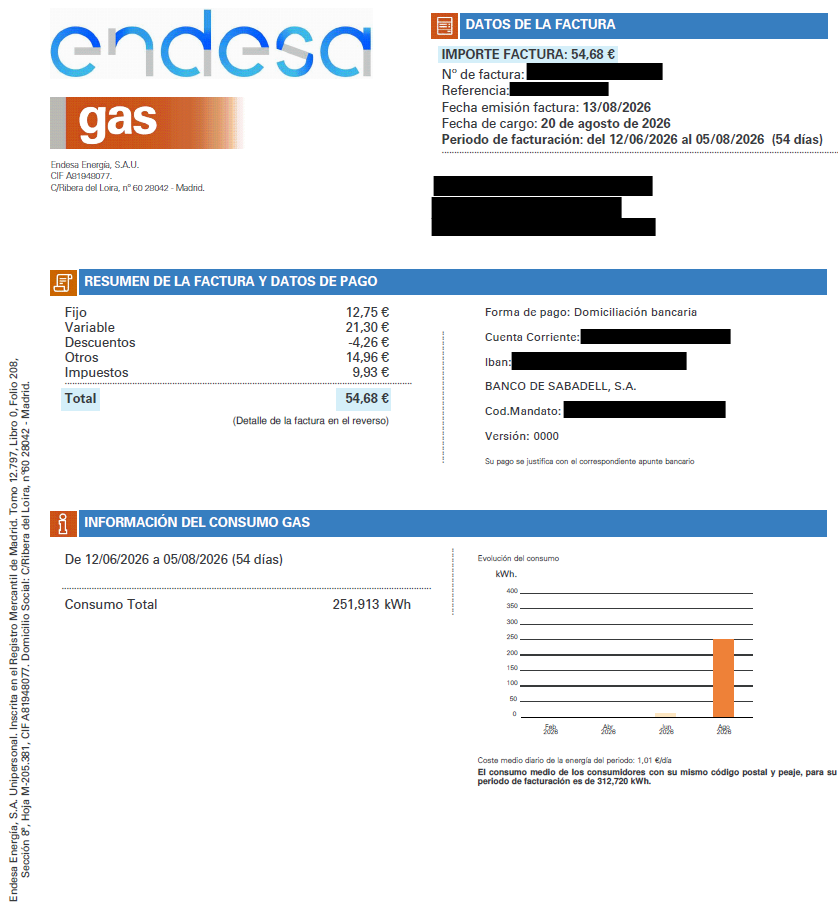
Why gas is measured in m³ but billed in kWh
Your gas meter records the volume used in cubic metres. However, your bill is calculated in kilowatt-hours because what you are actually paying for is the energy contained within that gas.
The conversion is done automatically and appears on your bill. Simply put:
Billed kWh = m³ used × conversion factor
This conversion factor depends on aspects such as the gas quality, the municipality and the supply pressure. That is why it can vary slightly from one bill to another.
Simple example
If your meter records a usage of 35 m³ and the applicable conversion factor is 11.2 kWh/m³, the billed usage will be:
35 m³ × 11.2 = 392 kWh
Those 392 kWh will be used to calculate the unit rate on your bill.
How to submit your gas meter reading
Gas meters are not digital, so a technician from the network operator must visit to read them. If they can access it, your bill is issued with an actual reading and you pay exactly what you have used. If they cannot, an estimated reading is issued based on your history, which is adjusted as soon as an actual reading is received: if you overpaid, it is deducted, and if you underpaid, it is added to the amount. To avoid these discrepancies, you can submit the reading yourself from the Customer Area, under 'Procedures' > 'Tariffs and usage' > 'Submit meter reading'. You just need your contract number, which appears at the top of your bill, and the reading shown on the meter. Make sure to submit it before your billing cycle closes, and bear in mind that the technician's reading always takes priority over yours. You can find the detailed process, complete with screenshots, in How to submit gas readings.
If your bill has already arrived and you disagree with the applied reading, the most practical approach is usually to wait: the next actual reading will correct the difference automatically, without you having to do anything. If you still prefer to make a claim, regulations require a minimum number of consecutive estimated bills: three if you are billed monthly and two if you are billed bimonthly. Below that threshold, the network operator will not process the claim, as it is considered a one-off issue that will be adjusted in the next billing cycle.
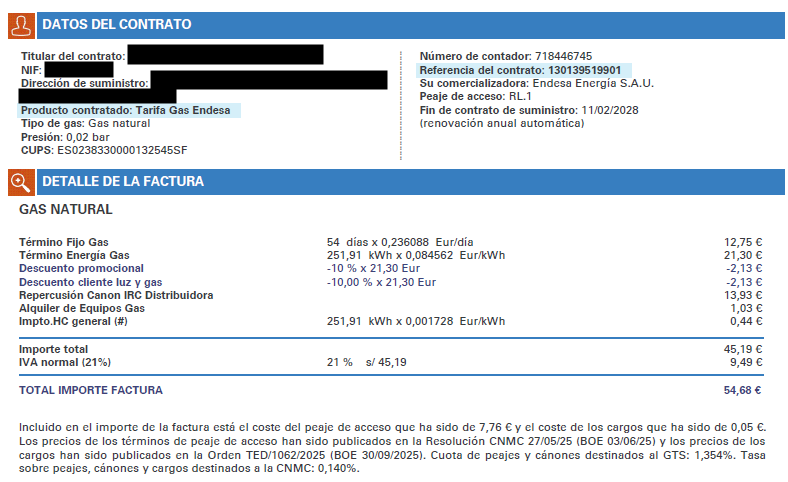
How your gas bill is calculated
Your gas bill is made up of several items. The main ones are:
- Standing charge.
- Unit rate.
- Discounts.
- Network charges and regulated costs.
- Meter rental, if applicable.
- Taxes.
- Maintenance services.
Let's look at them one by one.
1. Gas standing charge
The standing charge is the amount you pay to have a gas supply available, even if you do not use any during that period.
It covers part of the costs associated with accessing the gas network and is calculated based on the terms of your tariff.
Simply put:
Standing charge = daily price × number of billed days
For example, if your fixed price is €0.067/day and the bill covers 30 days:
€0.067 × 30 days = €2.01
This amount does not depend on how much gas you use. That is why it can appear on your bill even in months when you have barely used any gas.
2. Unit rate
The unit rate is the cost of the gas you have used during the billing period.
It is calculated like this:
Unit rate = kWh used × price per kWh
The price per kWh is the rate you agreed with Endesa according to your tariff conditions. You can check it in the bill breakdown and in the Customer Area under 'My contracts'.
Image suggestion: include a screenshot of a bill highlighting where the price per kWh and the energy used are shown.
3. Discounts
If you have a discount applied to your contract, it will not appear under the sections for
Standing charge or Unit rate, but rather in a specific discounts section. It is usually
shown with a minus sign, as it reduces the total bill amount.
4. Network charges and regulated costs
In addition to your tariff's commercial price, your bill includes regulated costs related to the use of the gas network.
Endesa does not set these costs. They are established by regulations and apply to all gas customers, both in the free and regulated markets.
On a free market bill, they may be integrated into the standing charge and unit rate, or shown separately. In either case, they form part of the cost of delivering gas to your home and keeping the network operational.
5. Meter rental
If you do not own your gas meter, you will pay a small fee for its use and maintenance. On the bill, this usually appears as 'metering equipment rental' or similar.
This amount is charged by your local network operator and Endesa includes it on your bill so you do not receive two separate invoices.
In most homes, the meter rental is a small amount, but it is worth checking if you want to understand your bill's grand total.
6. Gas bill taxes
Mandatory taxes are applied to your gas bill. The two most common are:
Hydrocarbon Tax
This is applied to your gas usage. The specific rate can vary if temporary tax measures are in place, so it is best to check the amount applied on the bill itself.
VAT
This is applied to the sum of the billed items: standing charge, unit rate, meter rental and prior taxes where applicable. The standard rate is 21%, although there may be temporary reductions approved by the Government.
This means your bill can go up even if you use the same amount of gas, should a temporary tax cut end or the applicable tax rate change.
7. Maintenance services
If you have an electricity or gas maintenance service, it will appear in the ‘Service bill breakdown’ section.
In this section, you will see the price of the maintenance service along with any active discounts, if applicable.
Additionally, the bill will display the final total amount, combining both your energy costs and your contracted services.
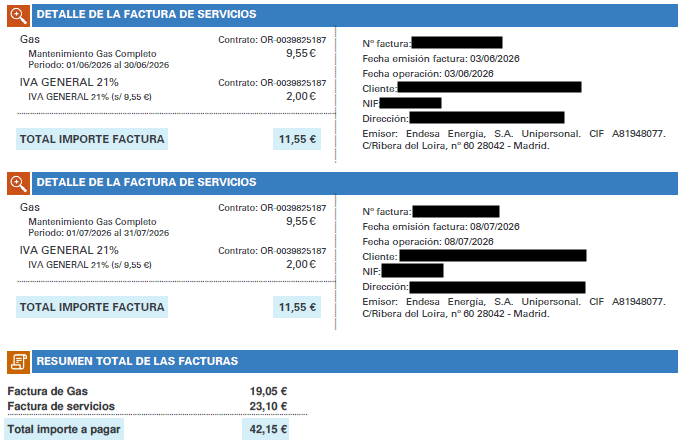
Indicative example: how a gas bill is calculated
Imagine a 30-day bill with an actual usage of 400 kWh.
The prices used in this example are indicative. Yours appear in your contract and in the Customer Area.
|
Charge |
Calculation |
Indicative amount |
|---|---|---|
|
Standing charge |
€0.067/day × 30 days |
€2.01 |
|
Unit rate |
400 kWh × contracted price per kWh |
Depends on tariff |
|
Discounts |
% discount on the unit rate |
Depends on applied promotion |
|
Meter rental |
Period fee |
Depends on network operator |
|
Hydrocarbon Tax |
400 kWh × current rate |
Depends on regulations |
|
VAT |
On the corresponding taxable base |
Depends on current rate |
The key takeaway is this: the final amount does not just depend on how much gas you use. It is also influenced by the number of days billed, the contracted price, whether there was an estimated or actual reading, the meter rental and current taxes.
Summary of gas bill items
|
Charge |
What it is |
Who sets it |
Does it depend on usage? |
|---|---|---|---|
|
Standing charge |
Cost of having an active supply |
Endesa, according to your tariff and conditions |
No |
|
Unit rate |
Cost of gas used |
Endesa, according to your tariff and conditions |
Yes |
|
Discounts |
Reduction applied according to your tariff |
Endesa, according to your tariff and conditions |
Depends on what the discount involves |
|
Network charges and regulated costs |
Costs associated with using the gas network |
Energy regulations |
Partially |
|
Meter rental |
Use and maintenance of metering equipment |
Network operator |
No |
|
Hydrocarbon Tax |
Tax applied to gas usage |
Government |
Yes |
|
VAT |
Value Added Tax |
Government |
Yes, applied to the corresponding base |
Why your gas bill has gone up
If your gas bill has gone up, it does not always mean your tariff has changed. These are the most common causes.
1. You have used more gas for heating
In winter, gas usage can increase significantly if you use heating. It is normal for a January bill to be considerably higher than a summer one, even with the same price per kWh.
2. Your previous bill was estimated
If, over one or more periods, less than your actual usage was billed based on estimates, the next actual reading may adjust the difference. In this case, the bill looks very high, but it includes usage that had not been charged previously.
3. Your tariff price has changed
If your contract includes price reviews, the standing charge or the price per kWh may be updated. You can check this in 'My contracts' within the Customer Area.
4. Taxes have changed
When a temporary VAT reduction ends or an energy tax changes, the bill total can go up even if your usage remains the same.
5. The billing period has more days
Not all bills cover exactly the same number of days. A 70-day bill will be higher than a 58-day one if your daily usage remains similar.
6. There is anomalous usage
If the increase is much higher than usual and cannot be explained by the weather, the reading or prices, check your installation. There could be a fault, a malfunctioning boiler or, in rare cases, a leak. If in doubt, contact an authorised installer.
What to check before disputing a gas bill
Before opening a claim, check these points:
- Whether the reading is actual or estimated.
- Whether the usage in kWh is similar to other comparable months.
- Whether the billing period has more days than usual.
- Whether the price per kWh or standing charge has changed.
- Whether an adjustment has been applied.
- Whether taxes have changed.
- Whether any additional contracted services appear.
If after reviewing these points you still think there is an error, you can open a claim from the Customer Area, in the procedures or bill help section.
Supplier and network operator: what is the difference?
Two distinct entities are involved in your bill:
Endesa, as the supplier
This is the company you hold your contract with. They sell you the gas, apply your tariff conditions and issue the bill.
Your local network operator
This is the company responsible for the physical network that delivers gas to your home. They also manage aspects like meter readings, metering equipment and certain network faults.
If you have a question about prices, your contract or your bill, you should contact Endesa. If the problem is related to the meter, the reading or the distribution network, the network operator may step in.
Manage your bill without calling
Many procedures can be done directly from the Customer Area or the Endesa Clientes app:
- View and download bills.
- Check your current tariff price.
- Review your contract.
- Submit your meter reading.
- Activate digital billing.
- Change your bank details.
- Open a claim.
View your usage history.
How to reduce your gas bill
Besides understanding your bill, there are simple steps that can help you use less.
Adjust the heating temperature
Keeping your home between 19 and 21ºC is usually enough to be comfortable. Every additional degree increases heating usage.
Bleed the radiators
If you have radiator heating, bleeding them at the start of the season helps remove trapped air and improves the system's performance.
Check the boiler
A boiler in good condition uses less, heats better and reduces the risk of breakdowns. Furthermore, gas installations must be inspected according to current regulations.
Improve insulation
Heat loss through windows, doors or thermal bridges makes your heating work harder. Draught excluders, thermal curtains or better insulation can help you maintain the temperature for longer.
Ventilate without cooling the home
Ventilating for a few minutes a day is enough to refresh the air. Avoid leaving windows open for a long time with the heating on.
FAQs about the Endesa gas bill
Where can I see the exact price per kWh?
You can see it in your bill breakdown and in the Customer Area under 'My contracts'. Your current tariff conditions appear there.
Why does my bill go up if I have used the same amount?
It could be due to a change in taxes, a billing period with more days, a price update or an additional item such as meter rental or contracted services.
What should I do if my bill is estimated?
You can submit an actual meter reading so it is taken into account in the next billing cycle. When an actual reading is received, the difference will be adjusted.
Can I make a claim if I think there is an error?
Yes. First, check the reading, usage, billing period, prices and taxes. If you still see a discrepancy, open a claim from the Customer Area or contact Endesa Customer Service.
What is a corrective bill?
It is a bill that corrects a previous one. It can be issued due to an error in usage, the applied price, contract details or any billed item. If you receive one, compare both bills to see what has changed.
How do I activate Digital Billing?
You can do this from the Customer Area or the Endesa Clientes app, in the procedures or communication preferences section. You will receive a notification whenever your bill is available.
Take a minute to find the product that best suits you:
{{firstStep.title}}
Take a minute to find the product that best suits you:
{{title}}
{{content.phone.title}}
{{content.phone.text}}
{{content.phone.phoneText}}
{{content.form.title}}
{{content.form.text}}
{{content.form.success.title}}
You don't need to adapt to Endesa's tariffs because they adapt to you. If you go to our catalogue you can compare the different tariffs for yourself. Or if you prefer, you can answer a few questions and we will take care of comparing all the different electricity and gas tariffs and then make a customised recommendation.
Take a minute to find the product that best suits you:
{{title}}
{{content.phone.title}}
{{content.phone.text}}
{{content.phone.phoneText}}
{{content.form.title}}
{{content.form.text}}
{{content.form.success.title}}
You don't need to adapt to Endesa's tariffs because they adapt to you. If you go to our catalogue you can compare the different tariffs for yourself. Or if you prefer, you can answer a few questions and we will take care of comparing all the different electricity and gas tariffs and then make a customised recommendation.
Comparison of Electricity and Gas Tariffs
You don't need to adapt to Endesa's tariffs because they adapt to you. If you go to our catalogue you can compare the different tariffs for yourself. Or if you prefer, you can answer a few questions and we will take care of comparing all the different electricity and gas tariffs and then make a customised recommendation.
Do you want to see all our offers?
Spend a minute to find the product which best adapts to you:
{{firstStep.title}}
Spend a minute to find the product which best adapts to you:
{{title}}
{{content.phone.title}}
{{content.phone.text}}
{{content.phone.phoneText}}
{{content.form.title}}
{{content.form.text}}
{{content.form.success.title}}
Spend a minute to find the product which best adapts to you:
{{title}}
{{content.phone.title}}
{{content.phone.text}}
{{content.phone.phoneText}}
{{content.form.title}}
{{content.form.text}}